目錄
Claude Code常常思考很久
想想這種情況:你對Claude Code下完提示詞,接著Claude Code就自動開始工作,開始瞭解檔案結構、瞭解既有功能、規劃新功能的實作等等。
對於我們來說,下完提示詞後,接下來是Claude Code的表演時間,等待Claude Code下一步的回應或是動作,除非打斷Claude Code,不然無法在當前對話下進行下一個動作。
Subagent讓Claude Code可以進行多工處理,並且不會影響原本的對話。
Subagent最大的特點是,他擁有自己獨立的對話環境,並且可以在背景執行,運算完成才會將產出的結論拋回主要對話。
我們可以為特定任務、特定工作流程建置subagent,來優化整個對話環境與工作流程。
除了環境獨立以外,還有以下優點:
- 保留主要對話:將實作從主要對話抽離
- 工具限制:限制可使用工具與subagents
- 跨專案重用:設定使用者層級的subagents,並且可跨專案重複使用
- 專注特定領域:針對特定知識、領域,給予特定的系統提示詞
- 控制成本:使用更便宜的模型,像是Haiku
一般情況,Claude Code會自行判斷並觸發Subagent,判斷方式是根據Subagent的描述跟當前對話的情境綜合判斷,當Claude Code發現接下來要做的事情跟Subagent匹配的時候,Claude Code就會自動執行Subagent。
建立Subagent
使用內建指令
/agents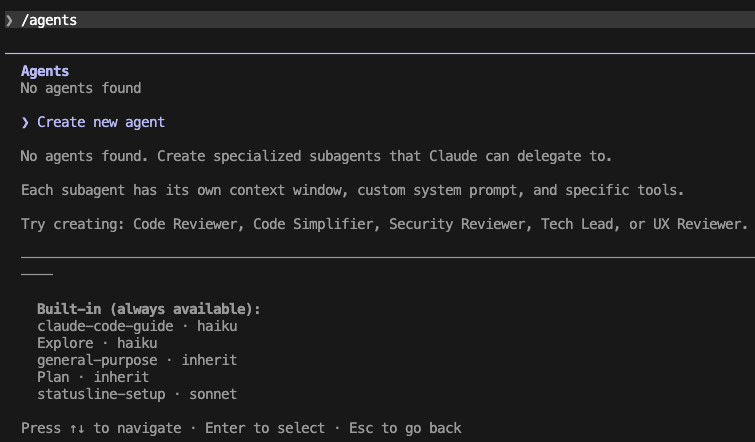
輸入後按下Enter,可以看到目前既有的subagents,我的截圖目前沒有subagents,因此只看得到「Create new agent」的選項。
在下方有Claude Code內建的Subagents,我們可以從這些內建subagents來學習,例如簡單的任務像是「Claude-code-guide」使用haiku模型,節省成本。
在「Create new agent」按下Enter:
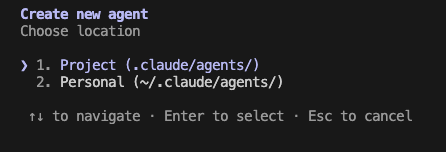
這一步讓我們選擇subagent的位置,Project就是建立在當前的專案目錄下,Personal就是在這台電腦使用者的家目錄底下。
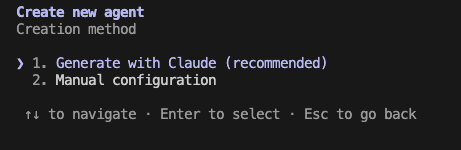
接著可以選擇手動設定,或是讓Claude Code幫我們產出subagent。
先嘗試透過Claude Code產出:

這邊簡單示範建置過程,輸入「create a code reviewer」讓Claude Code幫我們產出檔案。
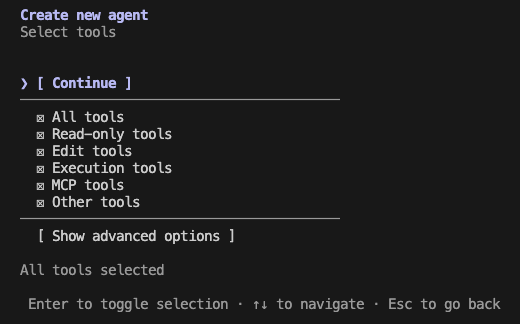
選擇Subagent可使用的工具,這邊選擇全部,然後繼續設定。
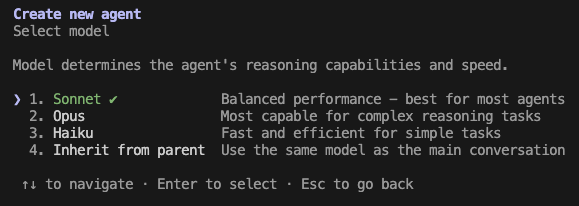
選擇模型。
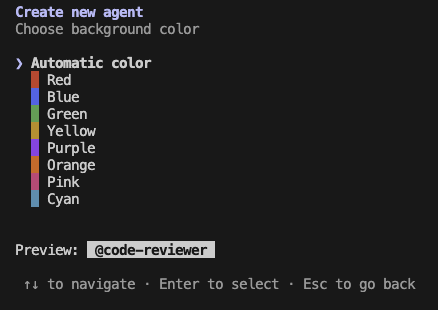
選顏色。
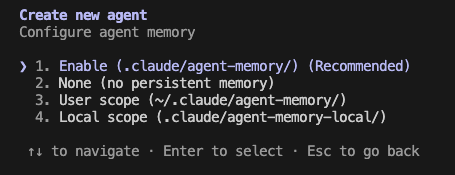
選擇記憶方式。
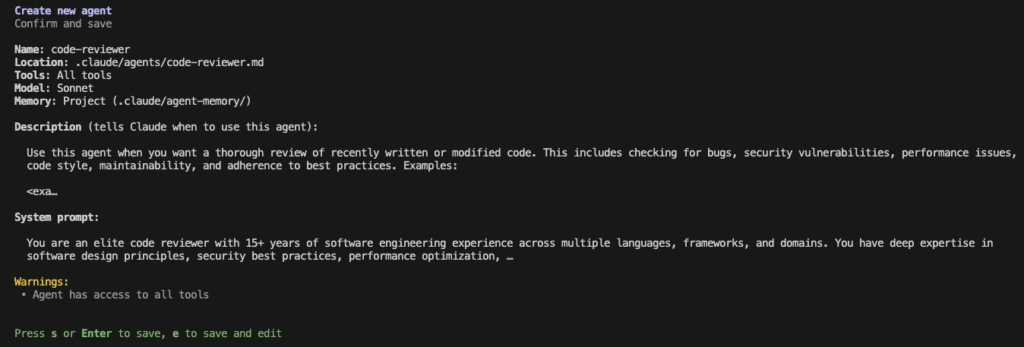
最終產出subagent的瀏覽畫面,如果內容沒有問題,按下Enter就大功告成啦!幾個步驟就能成功新增Subagent!
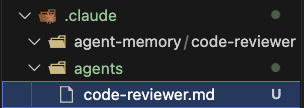
專案目錄底下就會新增一個「./claude/agents/code-reviewer.md」的檔案,這個檔案就是subagent本人!
在指定目錄下新增subagent的檔案
因為Subagent是一個.md檔案,所以我們可以在建立之後,輕易的去調整subagent的所有參數與設定,常見的設定有以下幾種:
選擇模型
選項有:
- Sonnet
- Opus
- Haiku
- Inherit from parent
根據狀況,若是簡單任務就選擇Haiku吧!可大幅減少Token的使用量。
選擇工具
選項有很多,像是:「Read」、「Grep」、「Glob」、…等等,可參考官網連結,查詢可用工具。
限制可用subagents
也可以讓Subagent去使用其他subagent。
---
name: coordinator
description: Coordinates work across specialized agents
tools: Agent(worker, researcher), Read, Bash
---
Agent後面的括號的意思是限制只能使用worker以及researcher。
如果沒有限制,則直接使用agent即可:
tools: Agent, Read, Bash預先載入SKILLs
直接讓Subagent在啟動時就直接注入SKILLs,這樣一來Subagent在執行時就不需要去尋找並且讀取SKILLs。
---
name: api-developer
description: Implement API endpoints following team conventions
skills:
  - api-conventions
  - error-handling-patterns
---

Implement API endpoints. Follow the conventions and patterns from the preloaded skills.
這邊需要特別注意的是,SKILLs會完整注入到Subagent的對話上下文裡面,而不僅僅是讓Subagent可以使用這些SKILLs。
讓subagent產生永久記憶
上面產出的code-review範例,我們使用的memory scope為proejct:
---
name: code-reviewer
description: "Use this agent when you ..."
model: sonnet
color: cyan
memory: project
---
其他的Scope還有:
| Scope | Location | Use when |
|---|---|---|
user | ~/.claude/agent-memory/<name-of-agent>/ | the subagent should remember learnings across all projects |
project | .claude/agent-memory/<name-of-agent>/ | the subagent’s knowledge is project-specific and shareable via version control |
local | .claude/agent-memory-local/<name-of-agent>/ | the subagent’s knowledge is project-specific but should not be checked into version control |
當memory啟用時:
- subagent的系統提示詞會包含memory資料夾中的檔案。
- subagent的系統提示詞包含memory.md的前200行內容,以及memory.md超過200行需要進行整理的說明。